Equipment Use

Studio Guidelines

Here are some things to keep in mind while using the MetroEast studio. For a printer-friendly copy of these guidelines, as well as the Studio Checklist, click here.

Getting started:
• Please begin by signing in at the Equipment Room.
• All crew members, guests and audience members are required to sign in and out at the front desk.
• Producers, please remember that all crew members operating studio equipment must be studio certified. We recommend that you use three camera operators and a minimum of two people in the control room.

During the shoot:
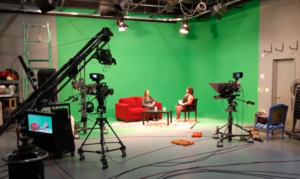
• Please no food or drinks in the control room or studio. The only exception is on the set for talent.
• The rear doors (leading to the parking lot) may be used while bringing in set items. Otherwise, please keep these doors closed at all times.
• Please do not work alone on the light ladder; another crew member must be on hand when setting lights. If you use any gels or cookies, remember to take them down at the end of the shoot. No one under the age of 16 may use the light ladder.
• Please be kind to your studio. Everyone is responsible for keeping the studio clean and in good condition. If everyone takes the time at the end of a shoot to see that everything is in order, then you’ll each be doing your part to keep the studio in good shape.

After the shoot:
• Return all lights to their original configuration. Zero out the master faders on the light dimmer board.
• Lock the tilt and pan on all cameras and figure eight the cables.
• Switch all camera CCU’s into BARS.
• Pull all faders down on the audio board.
• Save and close your project on the CG.
• Tidy up any desktop files you were using on the prompter and close down the prompter program.
• Remove your tapes from the decks.
• Return all set pieces to their proper place in storage. Please do not store your set pieces at MetroEast. No items are to be placed or stored behind the studio curtains.
• Return all equipment to the Equipment Room.
• Sweep the studio and control room floors. If there are any scuffmarks or dirt has been tracked in, please mop these areas.
• Wash any glasses or mugs used on the set at the kitchen sink.
• Clean up after yourself and the rest of the crew throughout the entire facility.
• Fill out a Studio Checklist and return it to the Equipment Room.

General Reminders:
• If you experience any difficulties, technical or otherwise, please tell a staff member.
• Please expect to spend the last 15 minutes of your studio reservation with a staff member to ensure the studio is in good condition.
• We require a minimum of three days notice to cancel a studio reservation. This gives us the best chance of re-booking the studio time. If your show was due to go out live, please contact the Playback department to make other arrangements, 503-667-8848 ext. 333.


Contact:Equipment Room
Phone:503-667-8848 ext. 307
email:john@metroeast.org
Address:829 N.E. 8th Street
Gresham, OR 97030

MetroEast Community Media helps everyday people make television programs. We offer media workshops and equipment, plus studio and video editing space. We show your programs and others from our community on eight (Comcast Cable & Frontier FiOS) channels. Visit us and get involved. Let your voice be heard, and see why we are community television and beyond.


Workshops

Workshop

Wed, Jun 19th — 6:30 - 9:30 pm
Wed, Jun 26th — 7:00 - 9:00 pm
Sat, Jun 29th — 11:00 - 2:00 pm
Sun, Jun 30th — 1:00 - 4:00 pm
Program Guide

Program Guide

11⋅22 – Community Access Network –
21⋅32 – Local Programming –
22⋅33 – Local Programming –
23⋅34 – Portland Community Media –
27⋅35 – Educational Programming –
28⋅36 – Portland Public Schools –
29⋅37 Al-Jazeera
30⋅38 – Municipal Programming –
Follow Us

Follow Us

Shop MetroEast...